

In this scenario, we prefer to keep the student in their current course, this means they remain associated with the same active student group/cohort
The idea is to duplicate their "now old" TRS enrolment to a new course
This course can be considered the “retirement” course and will hold the old TRS number and relevant unit outcome data
Steps required:
Create a "retirement" course for the qualification, ensuring that it contains all matching units of competency and that it is turned on for reporting
Find the original enrolment and transfer (with the duplicate option) to the "retirement" course as per the below screenshot example with the option of contact logs, documents etc being optional
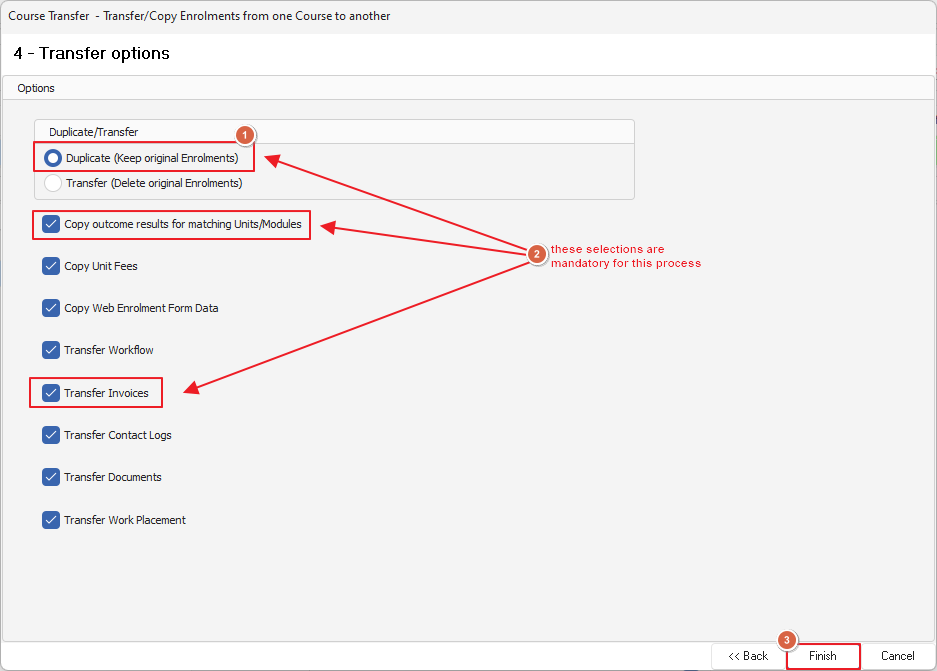
You now have two copies of identical enrolment data for your student, on the original course you can now update the TRS number you can also adjust the CPS via the CPS override option if needed and update the client company as needed
Manually review the RAPT data to ensure that you are happy with everything, this is easiest done through generating the RAPT files and accessing the preview window
