Microsoft has launched a new version of Outlook that is currently incompatible with PowerPro
What does this mean? For PowerPro users that use Outlook in their email configuration for sending client emails, you may no longer be able to send emails or be able to preview them in Outlook prior to sending them
The PowerPro team is working on a long-term solution however for now we recommend:
1. Switching back to Outlook Classic (if possible) from the Help menu at the top of Outlook there will be a button 'Go to class Outlook' which will switch you back

2. If switching back is not an option we recommend uninstalling the new version of Outlook and installing Outlook Classic you can find a link to the Microsoft store here
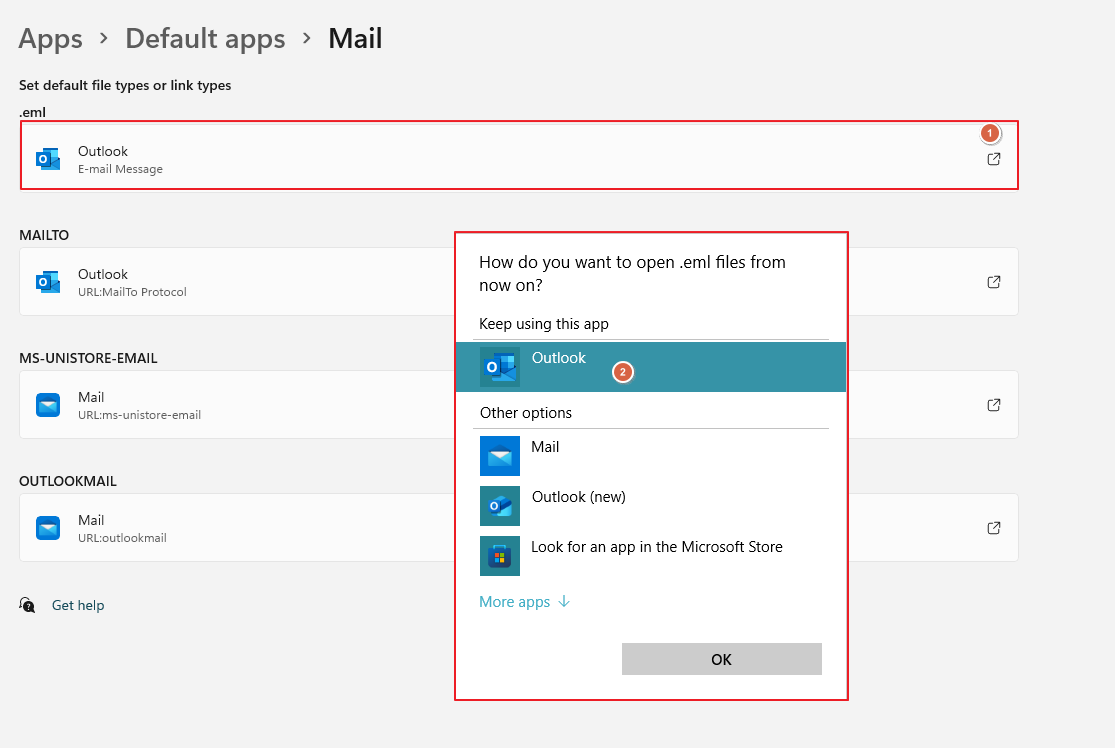
3. If you have both Outlook new and Outlook Classic running on the same system we recommend for use with PowerPro setting Outlook Classic as your default program. To do this you can search in your Windows search bar for 'default apps' click on the options (usually the top two: .eml and MAILTO) and change the default to Outlook (not Outlook new)