

When setting up courses to display on the web there is a requirement to select a Course Online Until date. There are three date types that can be selected:
Course Start Date
Course End Date
Specific Date
The Course Online Until date is inclusive so it will display up until 11.59pm on the date specified.
This may cause issues for one day courses as a prospective client can potentially book into the course after the course has been completed (unless it is fully booked).
For one day courses ONLY, to ensure that the course is removed from the web prior to the course starting it is best to use Specific Date as the date type. The date can then be set as the day before course commencement.
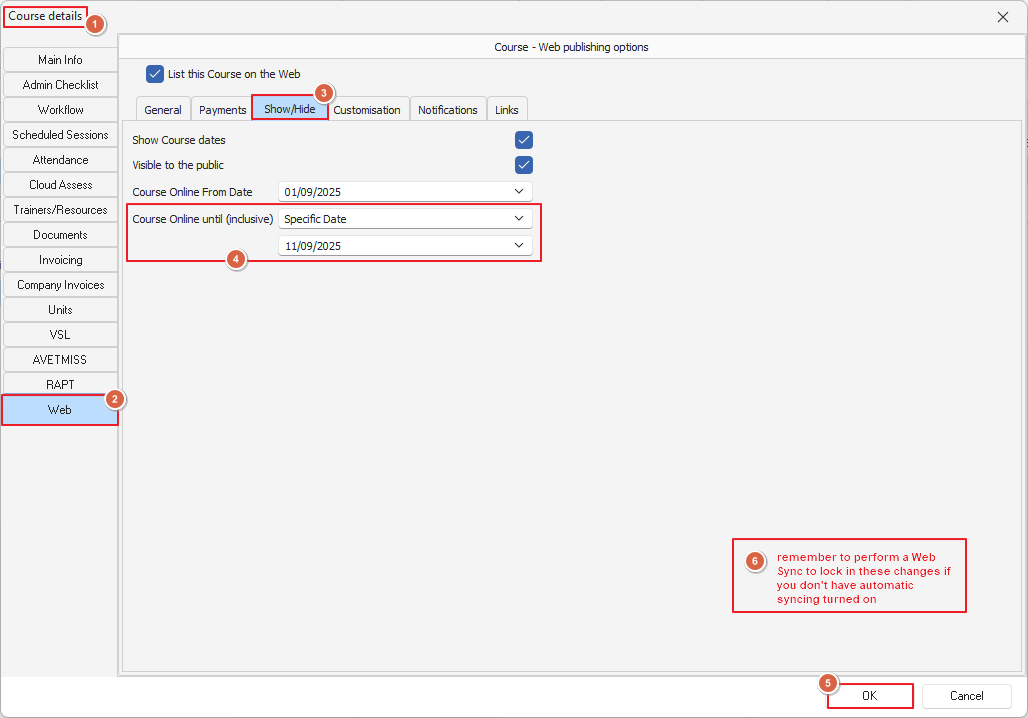
Screen above: Web Tab of the Course Details screen
Master courses can be set up in the same way as PowerPro will calculate the correct Specific Date to use based on the date set when cloning the course.