
Logo

Find step-by-step guides, troubleshooting tips, and feature explainers to get the most out of our platform.

My class roll keeps bringing up/repeating each student’s name instead of listing the different students in the course, why is that?

Document Templates

My class roll keeps bringing up/repeating each student’s name instead of listing the different students in the course, why is that?

Last updated on 30 Aug, 2024

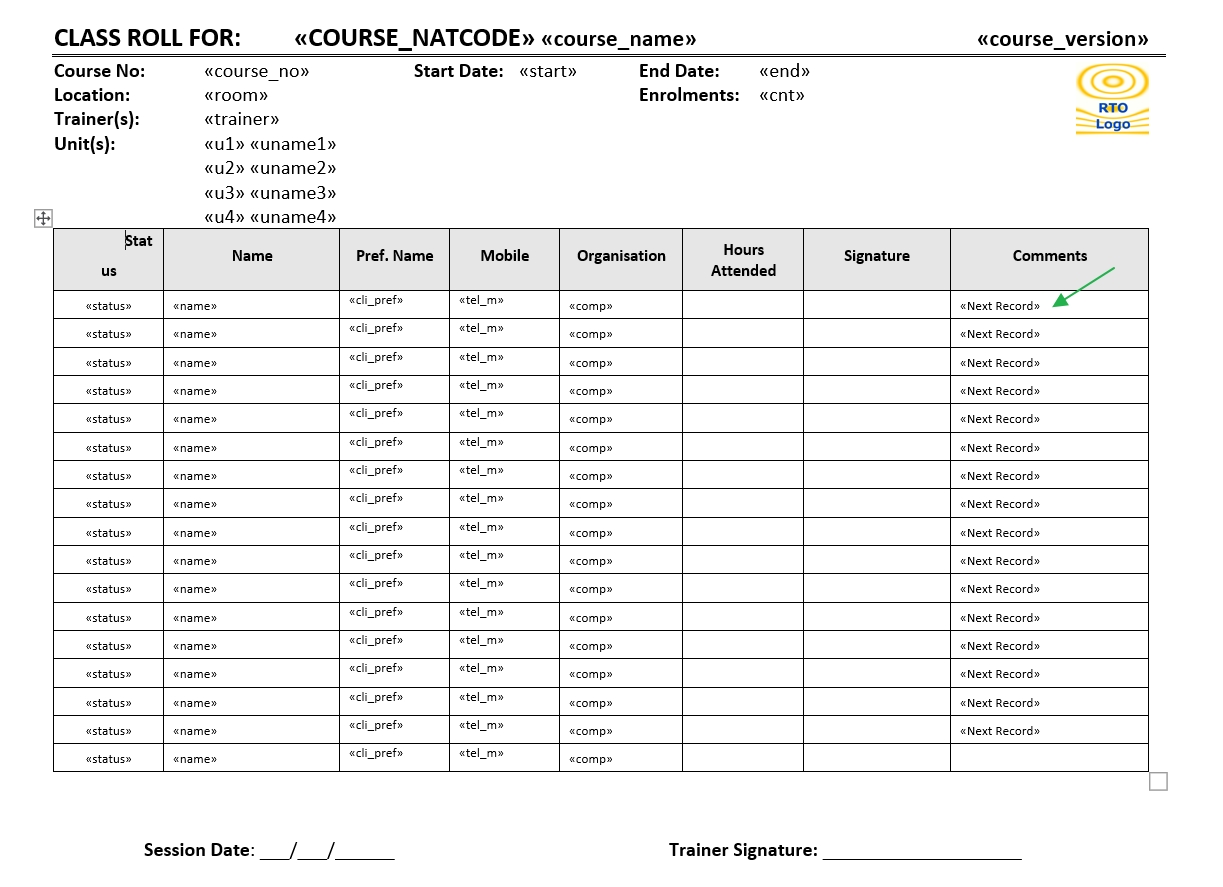
You need to have a "Next Record" merge command somewhere at end of each student's fields, as per example below:
Image

Use the Next Record rule to tell Word to proceed to the next record without starting a new page
Create your template with as many lines as you would like to appear on the roll, remembering that the last line should exclude the "Next Record" 
If your course has more clients than the template is set up with it will continue on to a new page
If you keep the "Next Record" on the last line it will likely jump a client, and leave them off the roll

Did you find this article helpful?
Previous

"The export failed due to an unexpected error" Word error when exporting to PDF

Next